How to Repurpose a Blog Post With AI Without Creating Duplicate Content (2026)
Publishing a good blog post takes time. You research the topic, write the content, edit it, add images, and finally publish it.
But one useful blog post does not have to be used only once.
You can take the ideas from an existing article and turn them into social media posts, email content, video scripts, newsletters, Pinterest descriptions, or short educational posts.
The challenge is doing this without simply copying the same content everywhere.
That is where AI can help.
When used properly, AI can help you repurpose a blog post with AI while giving each new piece of content a different purpose, structure, and angle.
The important part is that you should not ask AI to simply copy your article and change a few words. That usually creates content that feels repetitive and adds very little value.
Instead, the goal is to take the ideas from your original article and create genuinely different content from them.
In this guide, we will look at a practical way to do that.
What Does It Mean to Repurpose a Blog Post?
Repurposing a blog post means taking useful information from an existing article and adapting it into different content formats.
For example, imagine you have written a 1,500-word article about free AI writing tools for bloggers.
Instead of letting that article sit on your website and waiting for search traffic, you could turn its ideas into:
- A LinkedIn post about choosing the right AI writing tool
- An email explaining three useful features
- A short video script
- A Pinterest description
- Several social media posts
- A newsletter section
- A checklist
- A short educational post
The new content should not simply repeat the original article.
Each format should have its own purpose.
A LinkedIn post might focus on one lesson. A video script might explain one practical example. An email might share a personal workflow.
That is what makes content repurposing useful.
Why Use AI for Content Repurposing?
Doing all of this manually can take a lot of time.
You already have the research and main ideas in your original article, so AI can help you organize those ideas into different formats.
For example, you can give AI your article and ask it to identify:
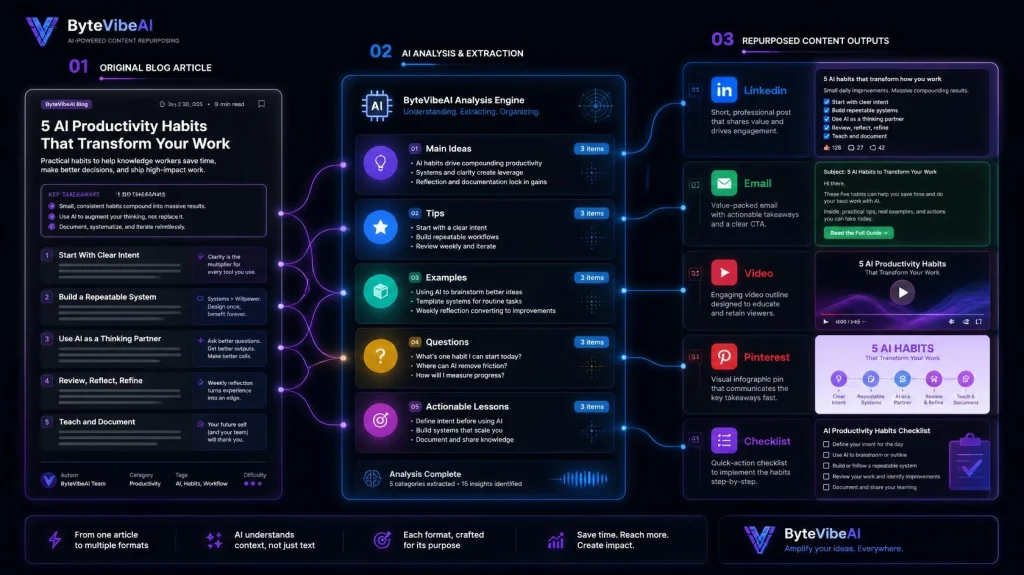
- Main ideas
- Important tips
- Common mistakes
- Practical examples
- Questions answered in the article
- Useful statistics or facts
- Step-by-step processes
- Different angles for future content
You can then choose which ideas are worth turning into new content.
This approach is much better than asking:
“Rewrite this blog post into 10 social media posts.”
That prompt encourages repetition.
A better approach is to ask AI to extract the ideas first, then create a different piece of content from one selected idea.
The Biggest Mistake: Changing Words Instead of Ideas
This is where many content repurposing workflows go wrong.
Suppose your original article says:
“AI writing tools can help bloggers create first drafts faster.”
Simply changing this to:
“AI writing software can help bloggers produce initial drafts more quickly.”
does not create a genuinely new piece of content.
The wording changed, but the content is basically the same.
Instead, you could take the underlying idea and create something different.
For example:
Original blog:
AI writing tools can help bloggers create first drafts faster.
LinkedIn post:
Three things I would never ask an AI writing tool to do for me.
Email:
How I use AI to get past the blank-page problem when starting an article.
Video:
A 60-second explanation of how to create a first draft without losing your own writing style.
The same original article provided the idea, but each piece serves a different purpose.
That’s the real value of repurposing.
How to Repurpose a Blog Post With AI Without Making It Repetitive
A simple workflow can make the process much easier:
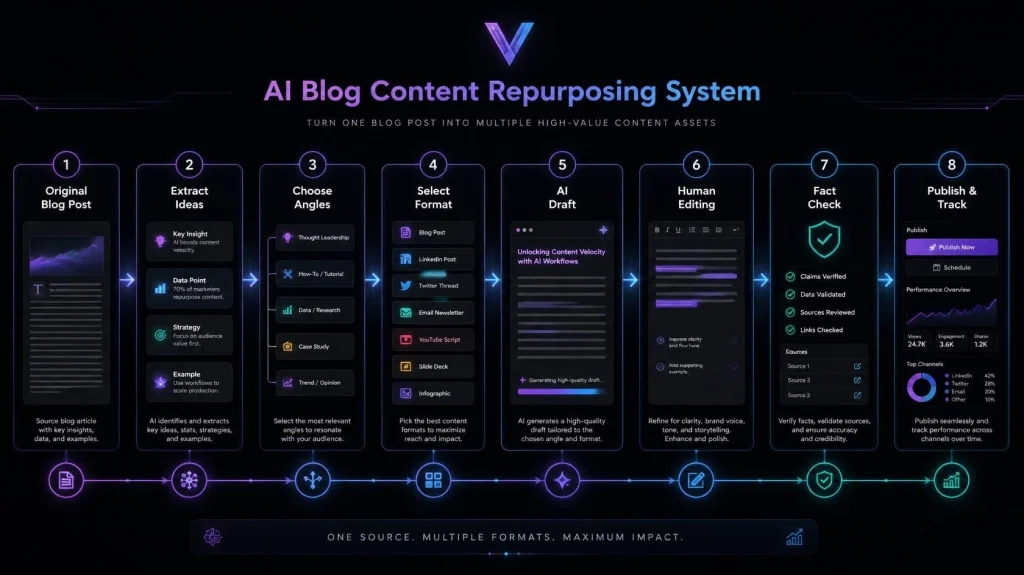
Original Blog Post → Extract Ideas → Choose a New Angle → Select a Format → Create New Content → Human Edit → Final Check
The most important step is choosing a new angle.
Before generating anything, ask yourself:
“What can this new piece of content offer that the original article does not?”
If you’re looking for tools to support your writing workflow, check out our guide to 5 Best Free AI Writing Tools for Bloggers and Freelancers to Boost Content Creation (2026)
If you cannot answer that question, the content probably does not need to be created.
Step 1: Start With a Blog Post That Has Multiple Ideas
Not every article is equally useful for repurposing.
A short article covering one simple fact may not give you much material.
A detailed article with several sections, examples, tips, and practical advice usually gives you more options.
Look for articles that contain:
- Several useful subtopics
- Step-by-step instructions
- Practical examples
- Frequently asked questions
- Common mistakes
- Useful tips
- Different opinions or approaches
- A clear process readers can follow
For example, a guide about using AI for SEO copywriting could contain enough ideas for several different pieces of content.
One section could become a LinkedIn post.
Another could become an email.
A practical workflow could become a video script.
A list of mistakes could become a social media carousel.
The original article becomes your source of ideas, not a script that you copy repeatedly.
Step 2: Ask AI to Extract Ideas First
Before creating new content, give AI the original article and ask it to break the article into its key ideas.
For example:
Prompt:
Analyze this blog post and extract its main ideas, practical tips, examples, mistakes, questions, and actionable lessons. Do not rewrite the article. Organize the information into separate content ideas that could be developed into different formats.
This gives you a content map.
You can then review the ideas yourself and decide which ones are worth developing.
This human review matters because not every extracted idea will be useful.
Some may be too similar.
Some may be too general.
Others may depend too heavily on the original article.
Choose the ideas that can stand on their own.
Step 3: Give Every New Piece a Different Purpose
This is one of the easiest ways to avoid repetitive content.
Before creating a new piece, define its purpose.
For example:
Blog post:
Teach the complete topic.
LinkedIn post:
Share one useful lesson or opinion.
Email:
Give readers a practical tip they can use quickly.
Video script:
Explain one concept visually or conversationally.
Pinterest content:
Create curiosity and encourage people to visit the full article.
Checklist:
Turn a process into quick steps.
The subject may come from the same original article, but the reader experience is different.
A Simple Rule to Remember
Don’t republish the same information. Repurpose the value.
Your original blog post should act as the foundation.
The new content should build something different from that foundation.
Once you have extracted the useful ideas from your original article, the next step is to decide how those ideas can be developed into genuinely different content.
The goal is not to make your blog post longer by producing dozens of slightly rewritten versions.
The goal is to extend the life of useful information while giving your audience something new each time.
Choose the Content Format Before Using AI
A common mistake is to give AI an article and simply ask it to “repurpose” it.
That is too vague.
Instead, decide what you want to create first.
For example:
- LinkedIn post
- Email newsletter
- Short video script
- Pinterest content
- Social media carousel
- Checklist
- Quick tips post
- FAQ
- Short tutorial
Then tell AI what the new content should accomplish.
This gives the tool a clear direction and makes it easier to avoid repeating the original article.
Turn One Section Into a LinkedIn Post
Suppose your blog post contains a section about common mistakes when using AI writing tools.
You do not need to copy that entire section into LinkedIn.
Instead, choose one mistake and build a short post around it.
For example:
Original article:
Five common mistakes when using AI writing tools.
New LinkedIn content:
The biggest mistake is asking AI to write everything before deciding what you actually want to say.
Then explain why this happens, give a practical example, and finish with a useful takeaway.
The new post has a different structure and purpose even though the idea came from your original article.
Useful prompt:
Read the section below and identify one useful lesson that can stand alone as a LinkedIn post. Create a fresh post around that lesson. Do not copy sentences from the original article. Add a practical example and make the post useful without requiring readers to read the original article first.
Turn a Blog Section Into an Email
Email content works differently from a blog post.
Your subscribers usually do not need a complete explanation of the entire topic.
Instead, you can take one useful idea and present it as a quick lesson.
For example:
Blog topic:
How to improve AI-generated writing.
Email angle:
One editing habit that can make AI-assisted writing sound more natural.
You can briefly explain the problem, provide the solution, and then invite readers to read the complete article if they want more detail.
This creates a natural relationship between the original article and the email instead of sending the same article to your subscribers again.
Create a Short Video From One Practical Example
Video is another good way to repurpose information.
But don’t turn the entire blog post into a video script.
Choose one problem.
For example:
Blog:
A complete guide to using AI for content editing.
Video:
“Three things to check before publishing AI-assisted content.”
The video can explain those three points in a conversational way.
You can even demonstrate one example on screen.
The original article provides the research, while the video provides a faster and more visual learning experience.
Create a Checklist From a Step-by-Step Section
Step-by-step articles are especially easy to turn into checklists.
Imagine your article explains a five-step writing workflow.
Instead of rewriting those five steps as another article, turn them into something readers can quickly scan.
Example:
AI Writing Checklist
- Define the main topic
- Identify the target reader
- Create an outline
- Review the first draft
- Add original examples
- Check facts
- Edit for clarity
- Complete the final SEO review
This format has a different purpose from the original article.
The blog teaches the process.
The checklist helps readers use the process.
Create Pinterest Content From a Different Angle
Pinterest content should not simply repeat your blog title.
Instead, use a specific benefit or problem from the article.
For example:
Original blog:
How to Improve Your Blog Writing With AI
Pinterest angle:
“7 AI Writing Mistakes That Can Make Your Blog Sound Generic”
The Pinterest content can introduce the problem and encourage readers to visit the full article for the complete explanation.
Again, the source is the same, but the presentation is different.
Use AI to Find New Angles
This is where AI becomes particularly useful.
After extracting your main ideas, ask it to find different angles that are not simply rewrites of the original article.
Try a prompt like this:
Based on the article below, suggest 10 genuinely different content angles. Each idea should focus on a different problem, lesson, example, question, mistake, or practical use case from the original article. Do not suggest simple rewrites or summaries of the article.
You might get ideas such as:
- Common mistakes
- Beginner questions
- A step-by-step workflow
- A personal productivity lesson
- A comparison
- A checklist
- A quick tutorial
- A case example
- Frequently asked questions
- Things to avoid
You can then choose the ideas that actually add value.
Don’t Publish Everything AI Suggests
More content is not automatically better content.
AI may give you 20 ideas, but you might only need three or four.
Before creating anything, ask:
Does this provide something useful that the original article does not?
If the answer is no, skip it.
This simple filter can prevent your website and social channels from becoming filled with repetitive content.
Check for Repeated Ideas Before Publishing
After creating a new piece, compare it with the original article.
Look for:
- Identical sentences
- Repeated examples
- Similar introductions
- The same sequence of ideas
- Repeated conclusions
- Unnecessary summaries
- Paragraphs that could be removed without losing the main point
You don’t need every new piece to contain completely different facts.
But it should have a different reason to exist.
For example, your blog may explain how to use an AI writing tool.
A LinkedIn post could explain one mistake beginners make with that tool.
An email could share one practical workflow.
A video could demonstrate the workflow.
Those pieces are connected, but they are not copies.
Add Your Own Experience and Examples
AI can help with structure and brainstorming, but your own experience can make repurposed content much more useful.
Add things such as:
- A real workflow you use
- A problem you encountered
- An example from your niche
- A lesson you learned
- A practical recommendation
- A specific situation your audience understands
For example, instead of saying:
“AI can help you write faster.”
you could explain how you use AI to organize research before writing an article.
That small detail makes the content more specific and useful.
A Simple Repurposing Workflow
You can use this process every time you publish an important blog post:
1. Publish the original article
Make the blog post your main, comprehensive resource.
2. Extract the key ideas
Ask AI to identify lessons, examples, questions, and practical tips.
3. Select different angles
Choose ideas that can stand independently.
4. Choose different formats
Decide whether each idea works best as an email, video, LinkedIn post, checklist, or another format.
5. Generate a first draft
Give AI clear instructions about the audience, format, length, and purpose.
6. Edit the content
Remove repetition and add your own examples.
7. Compare it with the original
Make sure the new piece has a clear reason to exist.
8. Publish and track the response
Pay attention to which formats your audience actually engages with.
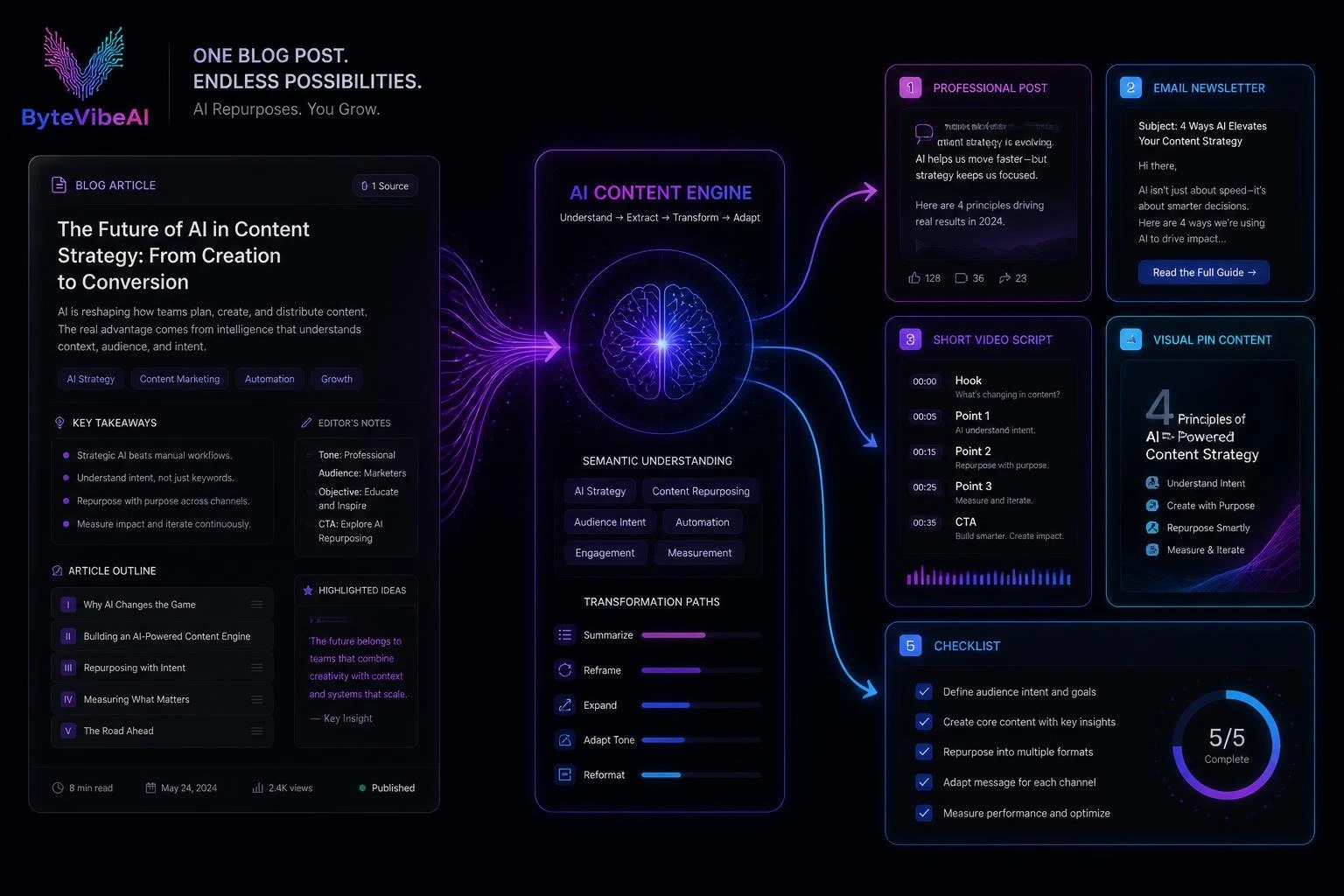
One Blog Post Can Become a Content System
The real benefit of repurposing is not producing 20 copies of one article.
It is building a small content system around one strong piece of work.
For example:
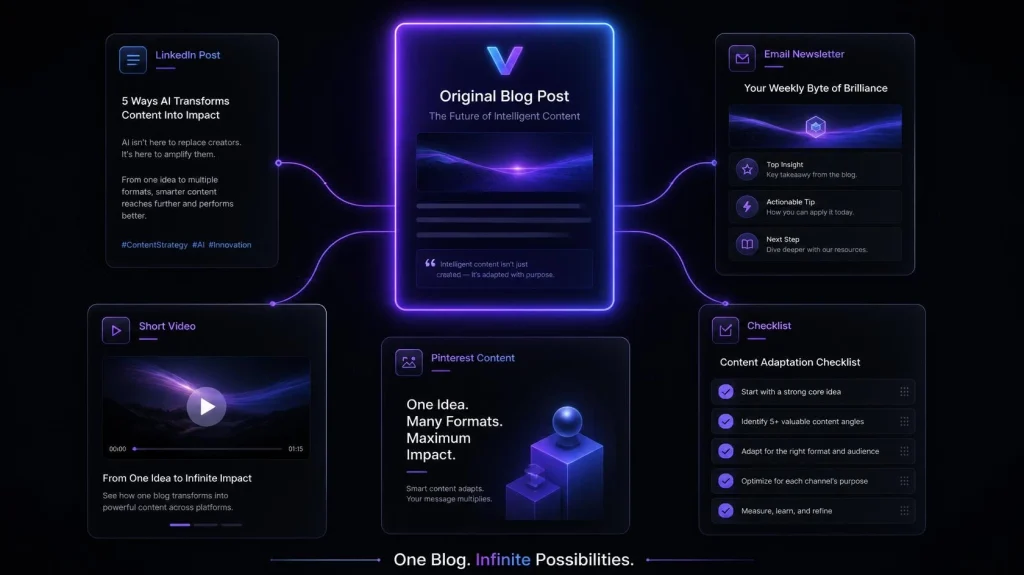
1 Blog Post
↓
3–5 Key Ideas
↓
LinkedIn Post + Email + Video + Pinterest + Checklist
↓
Different Audiences and Different Formats
This approach allows you to get more value from the research and effort that went into your original article without filling the internet with repetitive versions of the same content.
The Final Check Before Publishing
Before publishing any repurposed content, ask yourself five questions:
- Is this genuinely useful on its own?
- Does it have a different purpose from the original blog post?
- Have I removed unnecessary repetition?
- Did I add something specific or useful?
- Would someone benefit from seeing this even if they already read the original article?
If the answer is yes to all five, you have a much stronger repurposing workflow.
Repurposing a blog post becomes much easier when you stop treating it as a one-time task.
Instead of creating random posts whenever you have time, you can build a simple system that turns every strong blog post into several useful pieces of content.
The key is to keep the original article as the main source while making every new format different enough to provide its own value.
Create Platform-Specific Content With AI
Different platforms have different audiences and expectations.
A detailed blog post does not need to sound like a LinkedIn post, and a LinkedIn post should not read like an email newsletter.
Give AI instructions based on the platform you are creating content for.
For example:
Focus on:
- One useful lesson
- A practical observation
- A problem and solution
- A professional experience
- A clear takeaway
Focus on:
- One useful tip
- A short explanation
- A practical example
- A reason to read the full article
Short Video
Focus on:
- One problem
- A quick explanation
- A few clear steps
- A simple conclusion
Focus on:
- A clear benefit
- A specific problem
- A strong visual idea
- A reason to visit the full article
The subject can come from the same blog post, but the format and purpose should change.
Use Different AI Prompts for Different Formats
Instead of using one generic repurposing prompt, create separate prompts.
LinkedIn Prompt
Using the blog post below as a source of ideas, create a fresh LinkedIn post around one specific lesson. Do not copy sentences from the article or summarize the entire article. Make the post useful on its own, include one practical example, and use a natural professional tone.
Email Prompt
Use the following blog post to create a short email around one practical lesson. Do not summarize the entire article. Choose one useful idea, explain why it matters, and give the reader one action they can take. Keep the email conversational and useful.
Video Prompt
Turn one specific idea from this blog post into a short educational video script. Do not rewrite or summarize the article. Focus on one problem, explain the solution clearly, and include a simple example. Make the script conversational and easy to follow.
These prompts give AI a specific job instead of asking it to rewrite everything.
Be Careful With SEO When Repurposing Content
Repurposing content does not mean publishing the same article on multiple websites word for word.
If you publish content on your own website, social platforms, newsletters, or other channels, think about what each piece is supposed to accomplish.
Your main blog post should remain the detailed resource.
If you’re also using AI to create search-focused content, our guide on How to Use AI for SEO Copywriting covers a practical workflow for writers.
Your supporting content can point people toward it.
For example:
Blog:
Complete guide to using AI for content editing.
LinkedIn:
One important editing mistake.
Email:
One practical editing workflow.
Video:
A demonstration of that workflow.
Pinterest:
A visual summary of several useful tips.
This creates a connected content system rather than five copies of the same article.
Don’t Force the Same Keyword Into Every Piece
Your main article may target a specific search keyword.
That does not mean you need to repeat the exact keyword unnaturally in every social post, email, or video.
For example, if your blog targets:
“how to repurpose a blog post with AI”
your LinkedIn post might naturally discuss AI content repurposing.
Your video could focus on turning one blog post into multiple content formats.
Your email could simply discuss getting more value from existing content.
Natural language matters more than forcing the same phrase everywhere.
Watch for AI’s Repetition
AI can sometimes repeat the same point several times using slightly different wording.
This is especially common when you ask it to create multiple pieces from the same source.
After generating your content, look for phrases such as:
- “In today’s digital world”
- “It’s important to remember”
- “Whether you’re a blogger or marketer”
- “One of the biggest benefits”
- “By using AI, you can”
You do not need to remove every repeated phrase automatically, but if several pieces start sounding identical, rewrite them in your own voice.
This is one reason human editing remains important.
Don’t Let AI Invent Information
There is another important issue with repurposing.
Your original article may contain specific facts, statistics, product information, or claims.
When AI creates new content from that article, it may accidentally add information that was never in your original source.
Always check:
- Statistics
- Product features
- Prices
- Dates
- Quotes
- Research claims
- Tool capabilities
- Links
If something matters to the reader, verify it before publishing.
Create a Content Repurposing Calendar
You don’t have to publish every format on the same day.
A simple schedule could look like this:
Day 1: Publish the main blog post.
Day 2: Share one useful lesson on LinkedIn.
Day 4: Send an email with one practical tip.
Day 6: Publish a short video based on one section.
Day 8: Create Pinterest content around another angle.
Day 10: Share a different takeaway from the article.
This gives one article a longer life without making your audience see the same content repeatedly.
Keep a Simple Repurposing Checklist
Before publishing each new piece, run through this checklist:
- It has a clear purpose.
- It uses a different angle from the original.
- It does not copy paragraphs from the blog.
- It does not repeat the same introduction.
- It provides value without requiring the original article.
- Facts and claims have been checked.
- AI-generated wording has been edited.
- The format fits the platform.
- Links point readers to the relevant original resource when appropriate.
This takes only a few minutes and can prevent a lot of unnecessary repetition.
Common AI Content Repurposing Mistakes
1. Rewriting Every Sentence
Changing words while keeping the same structure does not create meaningful new content.
2. Creating Too Much Content
You don’t need ten pieces from every blog post.
Create only what you can maintain consistently.
3. Using the Same Introduction Everywhere
Different formats should have different openings.
4. Copying the Same Examples
Use new examples when possible.
5. Publishing Without Editing
AI drafts should be reviewed before publication.
6. Forgetting the Audience
A professional LinkedIn audience may want a different presentation from someone watching a short educational video.
7. Making Every Piece Promotional
Not every post needs to say “Read my blog.”
Teach something useful first. Link to the original article when it makes sense.
A Complete AI Repurposing Prompt
You can also use one structured prompt as the starting point for your workflow:
I want to repurpose the blog post below into several different content formats.
First, identify the main ideas, practical lessons, examples, mistakes, and questions covered in the article.
Then suggest different content angles that do not simply summarize or rewrite the original article.
For each selected angle, recommend the most suitable format, such as LinkedIn post, email, short video script, Pinterest content, or checklist.
Each piece must have a different purpose and structure. Do not copy sentences or paragraphs from the original article. Do not change only a few words and present the result as new content.
Keep important facts consistent with the original article and clearly identify anything that needs fact-checking.
Write in a natural, professional tone and make every piece useful on its own.
This prompt gives you a much better starting point than simply asking AI to “rewrite this blog post.”
The Complete Blog Repurposing Workflow
Here is the complete system you can use after publishing a strong article:
Research & Write
↓
Publish the Main Blog Post
↓
Extract Important Ideas
↓
Choose Different Content Angles
↓
Select the Right Format
↓
Create the First Draft With AI
↓
Add Your Own Examples & Experience
↓
Remove Repetition
↓
Fact-Check Important Information
↓
Edit for the Platform
↓
Publish & Track Results
This process allows you to get more value from the work you have already done without simply producing copies of your original article.
You can use a similar approach when updating older content; see our guide on How to Use AI to Rewrite Old Articles and Boost SEO Traffic (2026)
When You Should Not Repurpose a Blog Post
Not every article needs to become five different pieces of content.
You may want to skip repurposing when:
- The article is too short.
- It contains only one simple idea.
- The information is outdated.
- The topic has changed significantly.
- You cannot find a genuinely different angle.
- The new content would only repeat the original.
Quality matters more than the number of pieces you publish.
A strong article that produces two genuinely useful pieces of supporting content can be more valuable than an article turned into fifteen repetitive posts.
Final Thoughts
Learning how to repurpose a blog post with AI can help you get more value from the research and effort behind your existing content.
But successful repurposing is not about changing words.
It is about finding useful ideas inside your original article and developing those ideas for different audiences, formats, and purposes.
Use AI for brainstorming, organizing, outlining, and creating first drafts. Then review the content yourself, remove repetition, check important facts, and add your own perspective.
The best workflow is simple:
One strong blog post → Different ideas → Different angles → Different formats → Human editing → Useful content
That approach gives your existing content more reach while keeping every new piece purposeful and distinct.
Build a Smarter AI Writing Workflow
Repurposing is only one way to get more value from your content.
You can also use AI for research, editing, SEO, headlines, email writing, and everyday content workflows.
Call to Action
Want more practical AI writing tips, SEO strategies, and productivity guides?
Visit ByteVibeAI for beginner-friendly tutorials, detailed tool reviews, AI writing resources, and actionable guides designed to help bloggers, freelancers, marketers, and business owners create better content and grow their websites.